You give RunOutNow three things: a place, a rough start time, and how long you will be outside. It gives back one decision you can act on. Below is the whole path from a weather forecast to the clothes on your back, including what is Pro and what the app deliberately does not do.
The question I could not answer at the door
My runs start around 5 a.m. I used to stand at the door, mostly dressed, phone in hand, swiping through five screens of weather. I always had plenty of numbers and no answer, because the question was never what the weather is. It was what do I put on, and do I go.
RunOutNow answers both for one outing: the run you are about to take, at the place you will take it, for the next one, two, or three hours. Everything below is how that works.
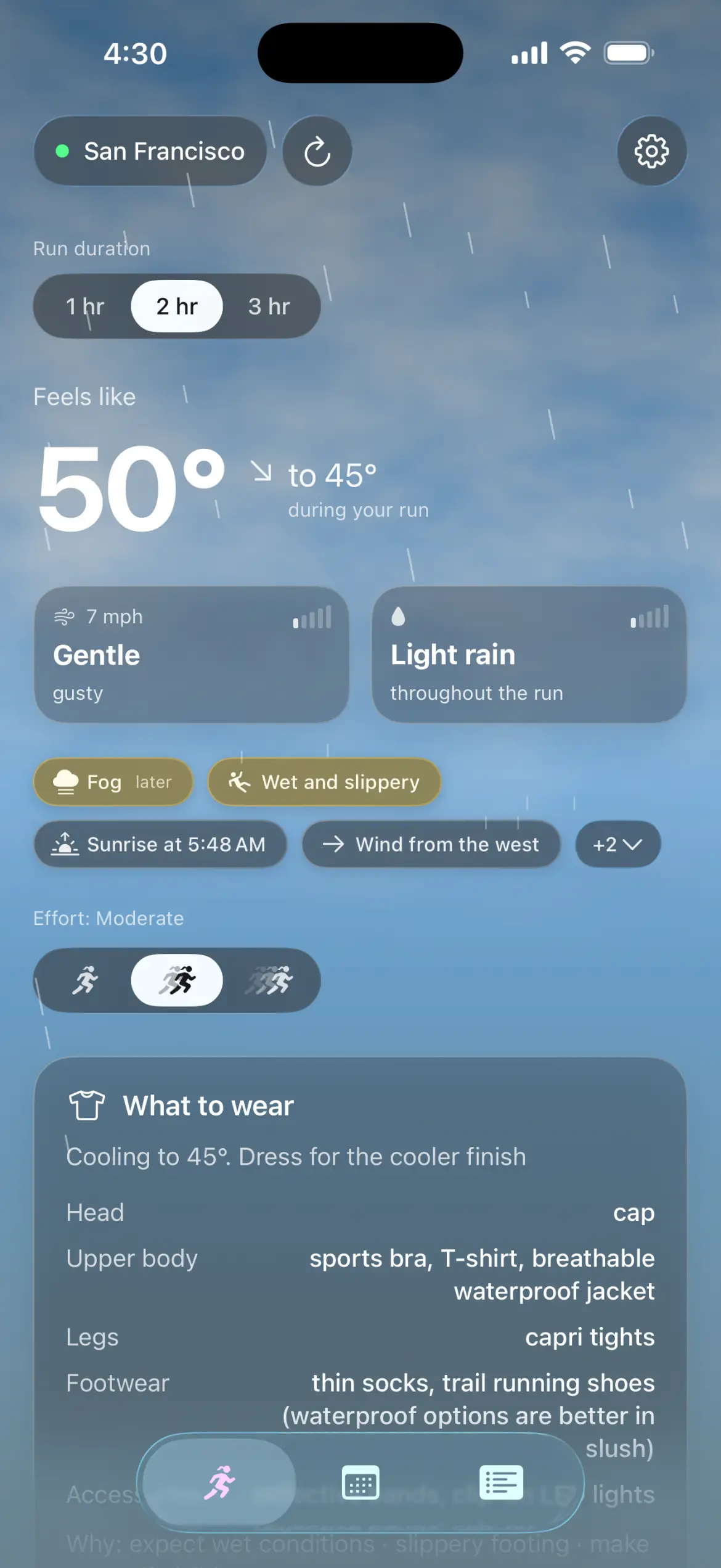
The Now screen with a two-hour window. The whole answer on one screen: the window, how the weather changes inside it, the warnings that matter, and the outfit. Authored scene, not a live forecast.
The five steps
This is the order the app works in, and the order I use it in at the door.
Step 1Pick the place and the window
You choose where you are running and how long you will be outside: 1, 2, or 3 hours. That window is the unit of everything that follows, because most of what changes your outfit happens after the first minute.
You can use your current location, or pick a city, an address, or a point on a map. A place you pick by hand never touches GPS, so location permission stays optional and the answer is the same either way. Times and daylight follow the selected place's own time zone. A fresh install starts at one hour; change it once and the app keeps it.
Step 2The app reads the whole window, not the first minute
This is what separates RunOutNow from a weather app. The weather at the door is only the first minute of your run. The app reads every hour inside your window and turns them into things a runner can act on:
Temperature movement. A cooling run is a different clothing problem than a steady one, so the app dresses you for the coldest part, not the warmest, and says what can come off when it warms.
Wind over time. On two and three hour runs, wind can be marked as picking up midway, picking up by the end, or easing by the end.
Rain timing, honestly labeled. The app says whether rain starts within the hour or in about two hours, how long it has left, or that it will last the whole run. A chance of rain stays a chance.
Daylight and footing. Sunrise and sunset are tied to their real local time, and darkness changes what you wear and carry. Ice, slush, and wet ground are read together, not from temperature alone.
One example I use often: it is dry when you leave, and rain arrives in hour two. A weather now app dresses you for the dry minute you are standing in. RunOutNow dresses you for the hour you will actually be outside, and tells you why.
Every image and the clip on this page come from the app itself, captured with fixed sample scenes so the examples stay stable. Nothing here is a hand-drawn mockup. The storm and rain scenes are authored, not live forecasts, and the plan screen uses a saved set of real weather responses.
Step 3You get an outfit, head to toe, and the warnings that matter
The answer is a complete list in dressing order: head, neck, upper body, hands, legs, footwear, and accessories, plus a short what to bring list and a line explaining why. No charts to read, and empty slots simply disappear.
Behind that list is a temperature ladder from deep cold to summer heat, with wind, rain, humidity, sun, visibility, and footing rules on top. Two details worth knowing, because they are the ones people ask about:
Sustained wind changes the outfit. Gusts only warn you. A steady wind can add a shell or a windproof layer. A gust gets a warning, not a redesigned kit.
A possible shower does not dress you. A small chance of rain stays exactly that, a chance. Only a forecast the app is confident about changes your clothing, and rain that is already falling dresses you because it is happening.
When conditions turn serious, the app says so in plain language and offers the honest option. Thunderstorms, freezing rain, freezing drizzle, and blizzards get timed warnings. Deep cold gets the same treatment: a plain warning, and a dangerous wind chill can tip that warning on its own. The app's own line is the same one I published: below minus 13°F, it is best to avoid running outside. And it keeps dressing you. Even at its strongest warning the full outfit stays on the screen, because the app gives you its honest read and still leaves the decision with you. It is not a gate.
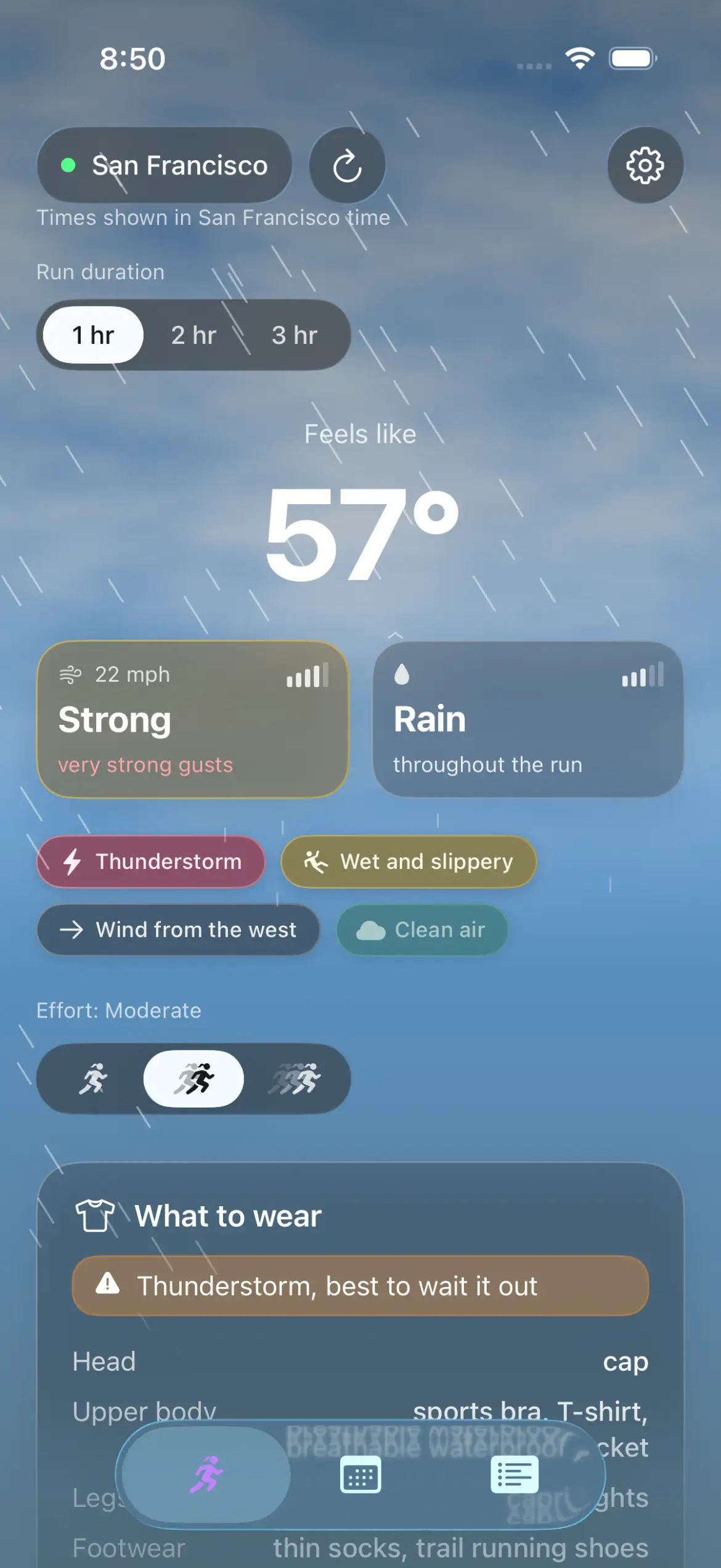
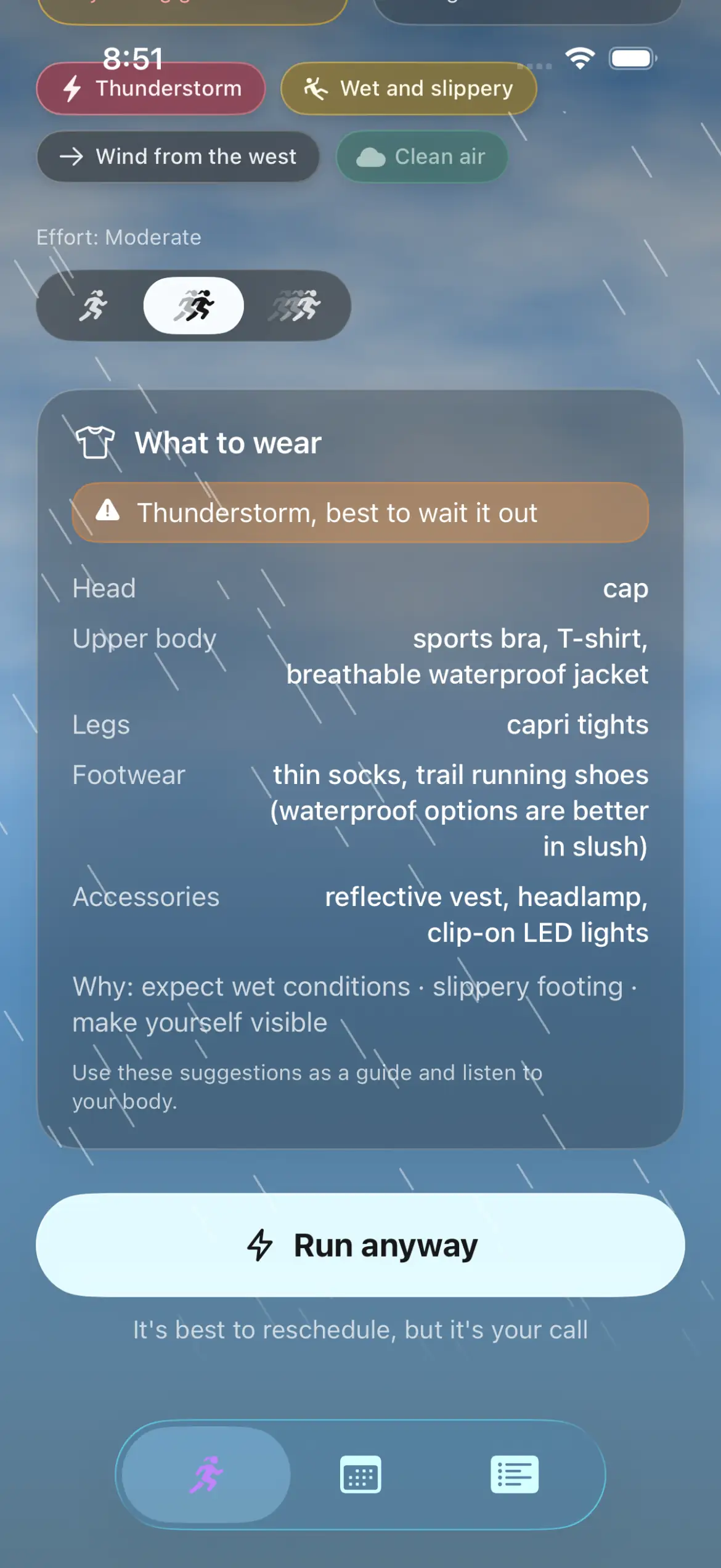
A thunderstorm in the window. The banner and the outfit come from the same window and the same reading. The app can suggest waiting, but it never locks the button: it becomes Run anyway.The bottom of the same screen. The outfit is complete, the reasons are listed, and the decision stays yours. My published limit is the same one the app uses, so I do wait when it says wait.
Two Pro choices shape the same advice without touching the forecast. Effort tells the app whether you are going easy, moderate, or hard, and moves the outfit a step warmer or lighter. It does not change the weather, the warnings, or the safety line. Men's or women's gear is exactly that, a garment set, not a theory about how your body handles cold.
Step 4If the time is wrong, compare another one
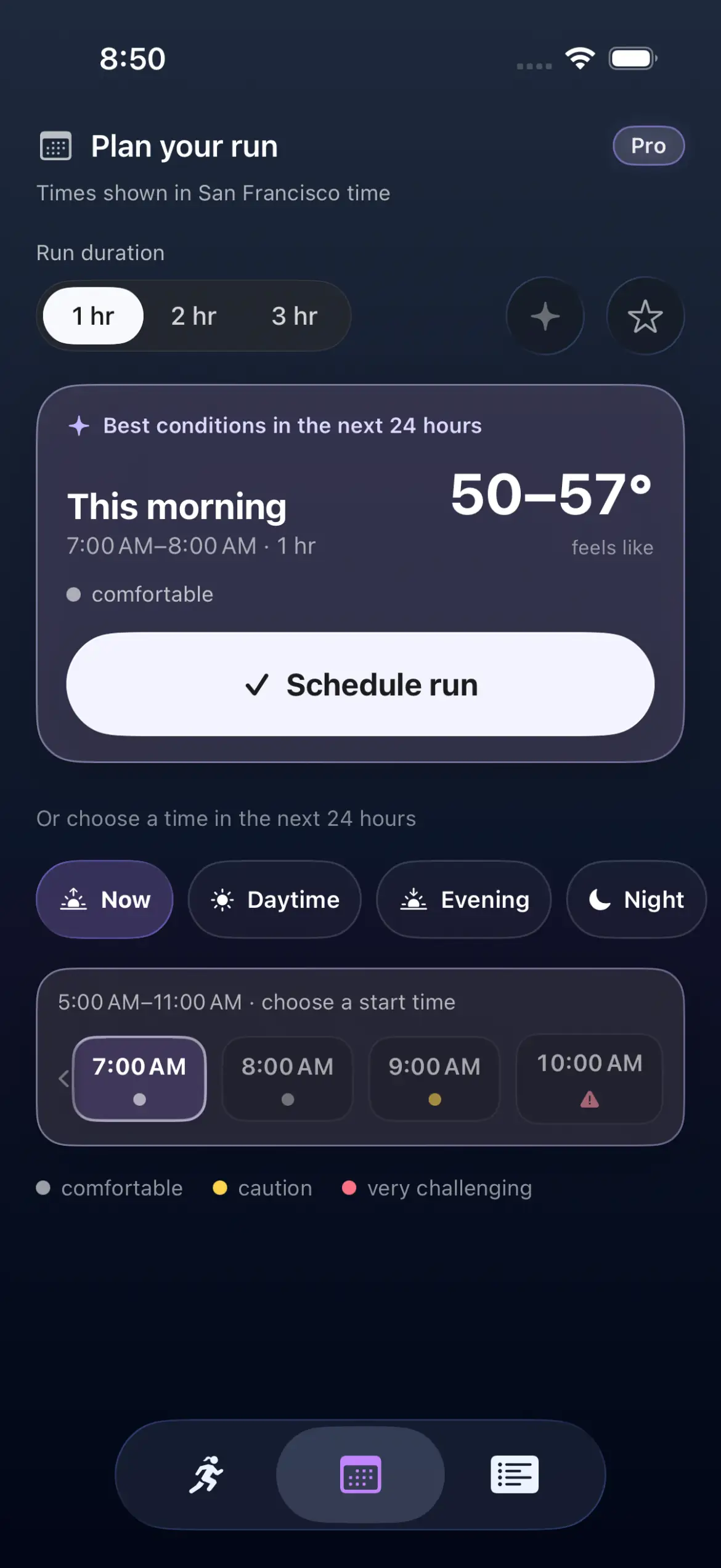
The Plan tab looks at the next 24 hours and compares start times. Every candidate is judged as a full window of your chosen length, not as a single hour, so a mild-looking hour that runs into a windy one does not win by accident. The app marks the mildest run of the day and shows you the hours around it.
This is the honest version of finding a better time. It is not looking for perfect weather, just the least difficult window in the next day, and it is happy to tell you your usual 6 a.m. is fine.
Preferred times (Pro) let you pick the parts of the day you actually run. The app searches there first and still points out a milder window elsewhere. One saved run (Pro) holds a single upcoming outing with its full weather and outfit: a preparation tool, not a training calendar, and it clears when you move to a substantially different location.
The Plan tab. Four day parts, every hour of the next 24, and the mildest window marked, judged across the whole run rather than the first hour. A saved set of real weather responses, so the numbers are not invented.
Step 5Run it, then tell the app how the clothes felt
Tapping Run now freezes the advice. The app records the outfit, the conditions, the duration, the effort, and your profile as they were at that moment, so later changes never rewrite what it told you. If the advice was wrong, the app has the receipt.
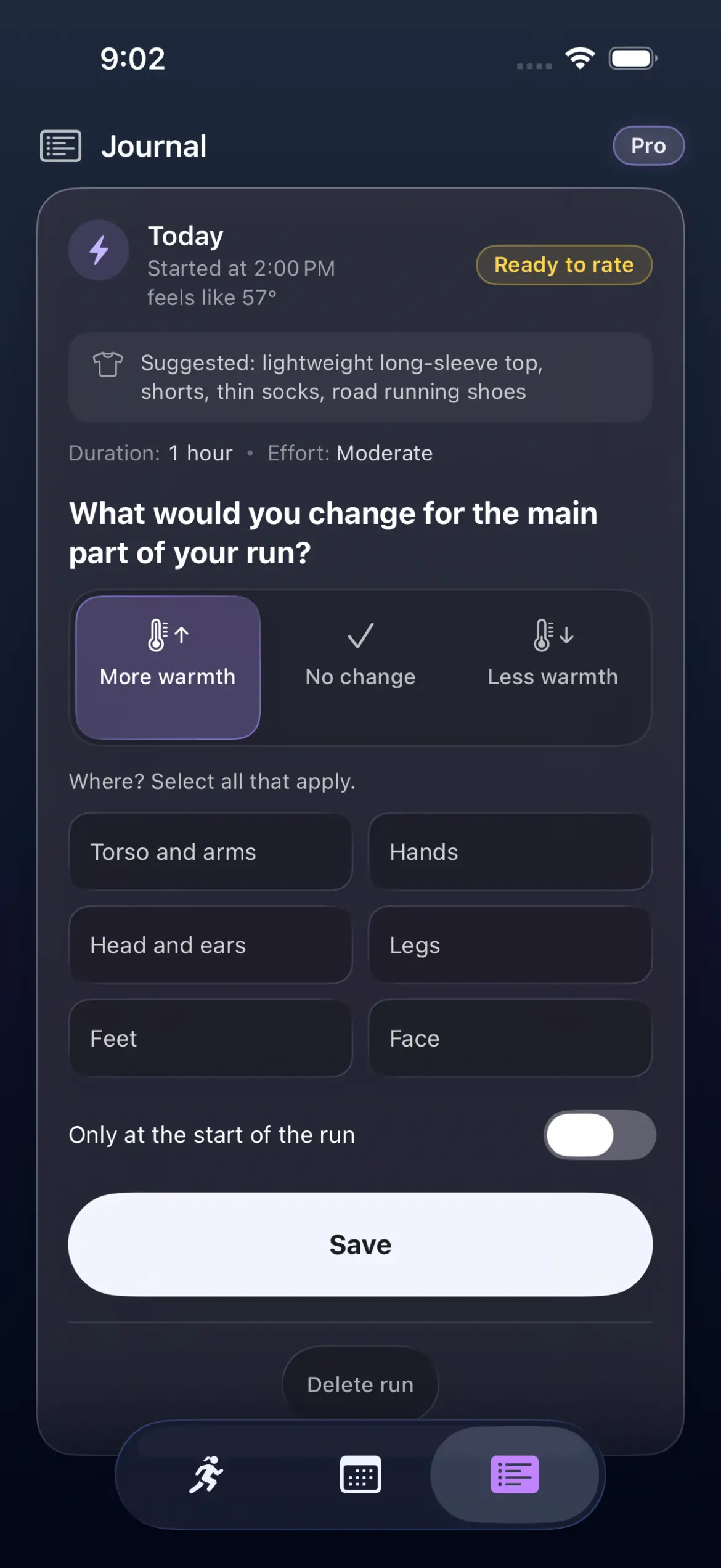
After the run, you answer one question: what would you change for the main part of the run? More warmth, no change, or less warmth. If you were too warm or too cold, you can name the body areas and say whether the problem was only at the start. The app answers with the specific change it will make, in the same language as the outfit, for example lightweight gloves instead of none.
This is where Pro advice becomes personal, and it is worth being precise about how:
Your ratings move one number, and only one. They shift a warmth adjustment the clothing ladder uses, and never change the forecast, the wind, the rain, or any safety threshold. A hot day stays a hot day.
Body areas are handled separately. Cold hands move hand gear; cold head moves head gear.
Cold only at the start turns into a note, not a bigger kit. Keep marking it, and the app suggests a removable warm-up layer instead of dressing you warmer for the whole run.
Old feedback fades. The adjustment is bounded and eases back toward the default after a few weeks without new ratings. Adaptation to newer experience, not a permanent verdict from one cold morning.
You can start over. Reset clothing adjustments clears what the app learned and keeps your run history.
One boundary I want to be blunt about: the journal is a clothing journal, not a GPS tracker. It does not record your route, distance, pace, heart rate, or calories, and it does not read Apple Health or your Apple Watch workouts. The workout numbers in the Out the Door log come from my watch, not from RunOutNow.
The rating screen after a run, shown with a sample run. The advice in the card is the advice saved when the run started, which is what makes the answer meaningful. A hands-only complaint moves only the hand gear.
What the app can show you
Everything below is drawn from the window you selected, and every item carries a plain-language explanation if you tap it. This is the complete set.
The two tiles
The Now screen always shows two tiles. The left one is wind. The right one is whatever matters most for your window at that moment, picked in a fixed order: precipitation, then footing, then dangerous heat, then dangerous air, then daylight.
Wind. How strong it is right now, in words from calm to very strong, with gusts and whether it is picking up or easing.
Precipitation. Rain, snow, or a storm, with the chance and how long it is expected to last.
Footing. Ice, slush, or a surface that is wet and slippery underfoot.
Heat. Warm, hot for running, very hot, or dangerous heat, including the first hot spell of the season.
Air. Smoke or extremely poor air, when breathing is the main concern.
Daylight. How much light is left, or how long until sunrise, down to polar day and polar night.
The chips
Up to four pills fit under the tiles. Anything else folds into a +N that opens when you tap it. The most serious one stays visible, and each explains itself in a sentence.
Footing
Good footing
Wet and slippery
Icy and slippery
Visibility and sky
Good visibility
Poor visibility
Fog
Freezing fog
Sunrise soon
Sunset soon
Serious weather
Thunderstorm
Blizzard
Freezing rain
Freezing drizzle
Humidity
Low humidity
Humid
Very humid
Oppressive humidity
The app judges this by dew point rather than the humidity percentage a weather app shows. You do not need to know what dew point is; I did not either when I started running. In plain terms, it measures how much moisture the air is holding that your sweat has to evaporate into: when the number is low your sweat dries and cools you, and when it is high it just soaks your shirt. The app reads it and hands you one of the four words above instead.
Sun
Low UV
Moderate UV
High UV
Very high UV
Heat and cold
Not hot
Warm for running
Hot for running
Very hot, use caution
Severe cold
Extreme cold, use caution
Air
Clean air
Moderate air quality
Poor air quality
Very poor air quality
Extremely poor air quality
Smoke
Dusty air
Pollen, Europe only for now
Low pollen
Moderate pollen
High pollen
Very high pollen
Wind
Wind from the west
Wind from the north
Strong gusts
Very strong gusts
The serious ones use a timing word wherever timing is knowable: rain that starts within the hour or in about two hours, a storm near the end, precipitation that lasts throughout the run. Fog uses the more honest later, because its onset is less exact.
The sky itself
The background behind the numbers is built from the same forecast, so you can often read the weather without reading a word.
Time of day. The sky follows the sun from dawn through daylight to dusk and a star field at night, and the stars dim under cloud cover or haze.
Clouds that move at the wind's speed. Cloud layers drift faster in a strong wind and slower in a light one, with a slower far layer for depth.
Fog, smoke, and dust arrive as a haze veil over the sky.
Rain and snow fall and tilt with the wind, and a thunderstorm adds lightning flashes.
Glare appears in three steps when the sun is genuinely strong and the risk of burning is real.
Window frost. In serious cold, feathery ice crystals grow inward from the edges of the screen, and they take over more of it as the cold deepens.
The background also carries a short spoken description of the weather for screen readers, so the visual layer never holds information that is not also available in words.
Nine seconds of the Now screen in light rain. The sky, rain, frost, glare, and thunder layers are drawn from the same forecast that produces the outfit, not from a stock animation.
Where the numbers come from
The forecast itself comes from Open-Meteo, which combines the national weather services, and the app credits it in its Settings. Everything the app adds on top is the same for everyone looking at the same place and hour: the same weather, the same warnings, the same safety line. Only your own settings and your own feedback change your outfit.
Three of its reads are worth knowing, because an ordinary weather app never makes them for you:
Heat is judged the way sports guidance judges it. The app uses a wet-bulb heat stress measure, the kind that accounts for humidity and sun instead of air temperature alone. That is why a sticky day can warn while a dry day at the same temperature does not.
The first hot spell is treated as its own risk. When today's high sits far above what the past couple of weeks have prepared you for, the app reads the same temperature more cautiously and tells you why.
Footing comes from evidence, not from temperature alone. The freezing level, the soil temperature, and whether the ground is wet decide together whether the surface is safe, wet, snowy, or iced over. Plain snow earns tread advice; proven ice earns studs or cleats.
The safety line is deliberately not personal. Effort and learned warmth can move your clothing, and they cannot move a heat warning, a frost warning, or the thunderstorm banner. Only the weather does that.
And the privacy side stays simple. For weather the app receives the coordinate of the place you selected, and nothing else; no name and no account are required. If you allow automatic location, that coordinate comes from your device, and a city you pick by hand never touches GPS at all. The app records no GPS running routes, and its own diagnostic log never stores coordinates, credentials, or what it receives.
Free and Pro
The core of the app works without an account, on purpose. I wanted the answer at the door to be available to someone who has not decided anything yet.
Free
Everything you need to get dressed and go
A complete outfit for any 1, 2, or 3 hour run, dressed for the coldest part of the window
The whole-window weather: temperature movement, wind changes, rain timing, daylight, footing
Warnings for serious conditions, including thunderstorms, freezing rain, and blizzards
Your choice of place: current location, city search, or a point on the map
Exploration of the next 24 hours in the planner
A local run journal on your device
The current-outfit Home Screen widget
No account and no email required.
Pro
For getting the advice to learn, and planning one run ahead
Effort-aware advice: easy, moderate, or hard
Men's or women's gear sets
Ratings and personal adaptation, including body-area feedback
Preferred running times, with a milder window still shown when one exists
One saved upcoming run with its full weather and outfit
Account sync for new journal runs
A post-run reminder to rate the outfit
The planned-run widget, which follows your saved run
Ratings are what teach the clothing ladder. If you never rate a run, Pro still gives you effort, gear set, planning, and the saved run.
One honest note: a different effort or a changed learned offset will not always change the list in front of you. Clothing changes in steps, so a small difference often lands inside the same step. When your kit does change because of your feedback, the app marks it, so you can see what your ratings did and what they did not.
What the app does not do
Trust is easier when the edges are stated as clearly as the features. RunOutNow is not:
A GPS or activity tracker. No route, distance, pace, heart rate, or calories. It does not read Apple Health or Apple Watch workouts.
A coach or a training plan. No schedule, no progression, no motivation system. It answers the dressing question and gets out of your way.
A calendar. The planner covers the next 24 hours and one saved outing. It is not a multi-run plan.
A pre-run alarm. It does not remind you before a planned run. It can remind you after the run that a rating is waiting.
An emergency service. Its warnings are guidance, not official alerts, and they do not replace weather warnings from your local authorities.
A route reader. It does not know which way you will run, so it will never pretend to know which mile is a headwind.
A global data source for everything. Pollen is not available for U.S. locations yet, so you will not see a pollen chip there. Air quality is shown as plain labels such as poor air quality, using European bands rather than a U.S. AQI number.
A safety guarantee. RunOutNow does not guarantee safety. Check the tips in the app before you go out, then use your own judgment and common sense.
Two smaller promises in the same spirit. If fresh weather is unavailable, the app can show your last saved forecast with its date, clearly marked as history, and it will not use it as current advice or as a warning. And the app never blocks a run. When it thinks you should wait, it says so and leaves the decision where it belongs.
The public test
Advice you cannot check is just marketing, so I am checking mine in public. The Out the Door log records my real runs, one entry at a time: what the app suggested, what I actually wore, how it felt, and what I am changing next time. The first run is already there, including the parts where the advice and the morning disagreed.
That is the whole loop of this app, and the same loop on the page you are reading: read the window, dress for it, go, then say honestly how it went. The app's job is only the first three.
If you want the answer at your own door, RunOutNow is available for iPhone and Android.